


SCSI (Small Computer System Interface) adapters are crucial components in various computing and storage environments, facilitating high - speed data transfer between devices. However, like any technology, SCSI adapters can encounter issues, which are often signaled by error codes. As a SCSI adapter supplier, understanding these error codes is essential for both us and our customers to troubleshoot problems effectively.
Common Error Codes and Their Meanings
1. SCSI Bus Timeout Error
This is one of the most frequently encountered error codes. A SCSI bus timeout error typically indicates that the SCSI adapter has not received a response from a connected device within the expected time frame. This can be caused by several factors.
- Cable Issues: Faulty or damaged SCSI cables can disrupt the communication between the adapter and the device. For example, if the cable is bent too sharply or has a broken wire, it can lead to intermittent or complete loss of signal.
- Device Malfunction: The connected device itself may be malfunctioning. It could be a hard drive, a tape drive, or any other SCSI - compatible device. A failing hard drive, for instance, may not respond to commands from the SCSI adapter in a timely manner.
- Termination Problems: Proper termination is crucial for SCSI systems. If the SCSI bus is not terminated correctly, it can cause signal reflections, leading to communication errors and timeouts.
2. SCSI Check Condition Error
The SCSI Check Condition error is a general indication that the device has encountered a problem. When this error code is triggered, the device usually provides additional sense data that can help diagnose the specific issue.

- Media Errors: In the case of storage devices like hard drives or tape drives, media errors are a common cause of the Check Condition error. These errors can occur due to physical damage to the media, such as scratches on a hard drive platter or a damaged tape.
- Device Configuration Issues: Incorrect device configuration, such as wrong drive settings or incompatible firmware, can also lead to this error. For example, if a SCSI hard drive is configured with the wrong block size, it may not function properly and trigger the Check Condition error.
3. SCSI Bus Reset Error
A SCSI Bus Reset error indicates that the SCSI bus has been reset unexpectedly. This can disrupt ongoing data transfers and cause data loss or corruption.
- Power Supply Problems: Unstable power supply to the SCSI adapter or connected devices can cause the bus to reset. Fluctuations in voltage or power outages can lead to sudden resets.
- Electrical Interference: Electrical interference from nearby devices, such as motors or power supplies, can also trigger a bus reset. This interference can disrupt the SCSI signals and cause the adapter to reset the bus in an attempt to recover.
Troubleshooting SCSI Adapter Error Codes
When faced with SCSI adapter error codes, there are several steps that can be taken to troubleshoot the issues.
1. Check the Hardware
- Inspect Cables: Carefully examine the SCSI cables for any signs of damage, such as frayed wires or bent connectors. Replace any damaged cables with high - quality ones. For example, our HPDB 68 Male to IDC 50 Male Adapter is a reliable option for connecting different SCSI devices.
- Verify Termination: Ensure that the SCSI bus is terminated correctly. Most SCSI systems require termination at both ends of the bus. Use termination resistors or terminators that are compatible with your SCSI adapter and devices.
- Test Connected Devices: Isolate each connected device and test it individually. You can use diagnostic tools provided by the device manufacturer to check for device - specific issues.
2. Update Firmware and Drivers
Outdated firmware or drivers can cause compatibility issues and lead to error codes. Check the manufacturer's website for the latest firmware updates for your SCSI adapter and connected devices. Installing the latest drivers can also improve the performance and stability of the SCSI system.
3. Check System Configuration
- Verify Device Settings: Make sure that the device settings, such as drive letter assignments, block sizes, and SCSI IDs, are configured correctly. Incorrect settings can cause communication errors between the SCSI adapter and the devices.
- Check for Resource Conflicts: In a multi - device environment, there may be resource conflicts between different SCSI devices or other system components. Use the system's device manager to check for any conflicts and resolve them.
Importance of Error Code Understanding for Our Customers
As a SCSI adapter supplier, we understand the importance of providing our customers with the knowledge and support to troubleshoot error codes. When our customers encounter SCSI adapter issues, they rely on us to help them resolve the problems quickly and efficiently.
- Minimizing Downtime: By understanding the error codes and being able to troubleshoot them effectively, our customers can minimize downtime. In a business environment, even a short period of downtime can result in significant losses. For example, a data center relying on SCSI - connected storage devices may experience a disruption in service if a SCSI adapter error is not resolved promptly.
- Cost - Effective Solutions: Proper diagnosis of error codes can help our customers avoid unnecessary component replacements. Instead of replacing the entire SCSI adapter or a connected device, they can identify and fix the root cause of the problem, saving both time and money.
Our Product Range and Error Code Mitigation
We offer a wide range of SCSI adapters and related products that are designed to minimize the occurrence of error codes.
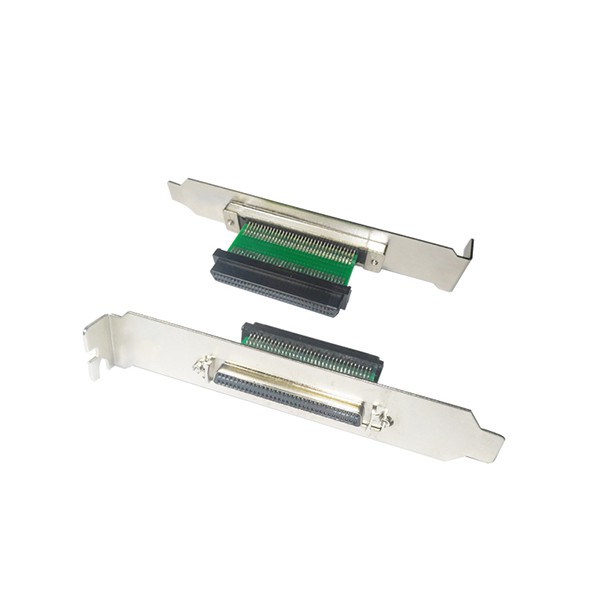
- High - Quality Adapters: Our SCSI adapters are built with high - quality components and advanced technology to ensure reliable performance. For example, our 68 Female to Female SCSI Adapter with Bracket is designed to provide a stable connection between SCSI devices, reducing the risk of communication errors.
- Compatibility Testing: Before releasing our products to the market, we conduct extensive compatibility testing with various SCSI - compatible devices. This helps us ensure that our adapters work seamlessly with different systems and minimize the chances of error codes due to compatibility issues.
- Technical Support: In addition to providing high - quality products, we also offer comprehensive technical support to our customers. Our team of experts is available to assist with error code diagnosis and troubleshooting, ensuring that our customers can get the most out of our SCSI adapters.
Conclusion
Understanding the error codes associated with SCSI adapters is essential for both us as a supplier and our customers. By being aware of the common error codes, their causes, and how to troubleshoot them, we can provide better support to our customers and help them maintain the reliability and performance of their SCSI systems.
If you are experiencing issues with SCSI adapter error codes or are looking for high - quality SCSI adapters and related products, we encourage you to contact us for a detailed discussion. Our team is ready to assist you in finding the best solutions for your specific needs. We have a wide range of products, including the SCA 80 to 68 Pin Female Adapter, which can meet various SCSI connection requirements. Let's work together to ensure the smooth operation of your SCSI systems.
References
- "SCSI: The Complete Reference" by George Shiffler
- "SCSI Architecture Model - 3 (SAM - 3)" standard document