



USB 3.0 Cable

USB 3.0 Cable is also called USB 3.2 Gen 1 Cable, used to connect computers and various external devices, such as Printer, camera, hard disk, scanner, USB flash drive, MP3, MP4, etc. Supports maximum 5Gbps transfer rate theoretically, which is 10 times faster than USB 2.0's 480Mbps.


Consist Of USB3.0 Cable
We all know that USB2.0 cable is made with 4 cores copper wire and and two USB 2.0 connector, but for USB 3.0 Cable, It is made with 9 cores copper wire and two USB 3.0 Connector. Compare with wire and connector difference, we can better understand why USB 3.0 Cable support higher transfer rate than USB 2.0 Cable.
There are several types of USB3.0 connectors, including USB 3.0 Type A connector, USB 3.0 Type B Connector and USB 3.0 Micro B connector. Each type connector has its unique design and use cases.

USB 3.0 Type A connector:
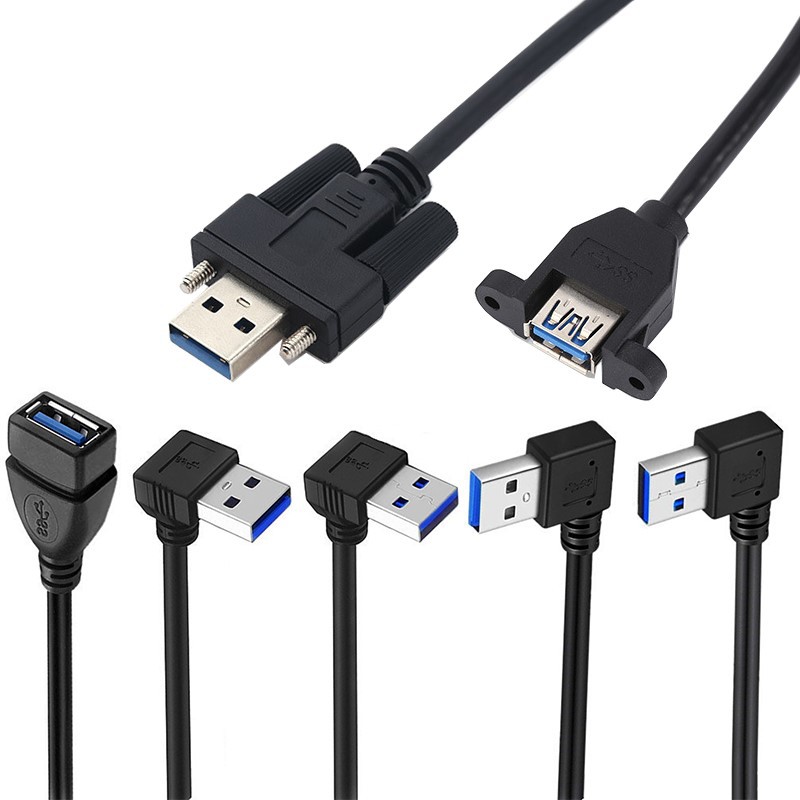
USB Standard-A interface is mainly used on host side and some device sides. Most obvious change in the appearance of USB 3.0 Standard-A connector is that the plastic part become blue, which is easily distinguish whether the USB interface on the motherboard, adapter card and cable is USB3.0 Interface or USB2.0 Interface. USB 3.0 A type connector is well backward compatible with USB 2.0 specification. Mainly used in host devices, such as computers, game consoles and TVs, as well as USB hubs. It is usually used to make USB3.0 Type A cable, USB 3.0 extension cable and Panel mount USB 3.0 Cable and USB 3.0 motherboard Cable.
USB 3.0 Type B connector:
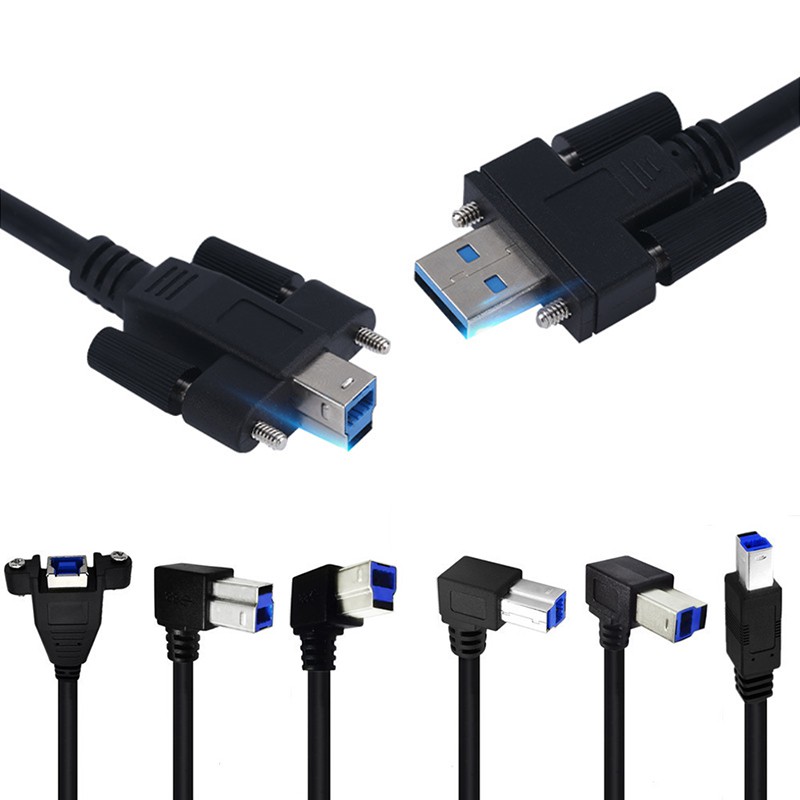
USB Standard-B interfaces are mostly found on peripherals such as printers and scanners, and some brands hard drives also use this interface. USB 3.0 Standard-B Connector is also similar to USB 2.0 in appearance. Its unique shape prevents two host devices from being connected together, thereby protecting the device, otherwise it may cause hardware damage. It is usually used to make USB 3.0 Printer Cable, USB 3.0 A to B scanner Cable, Panel mount USB 3.0 A to B Cable and USB 3.0 Type B extension Cable.


USB 3.0 Micro B connector:
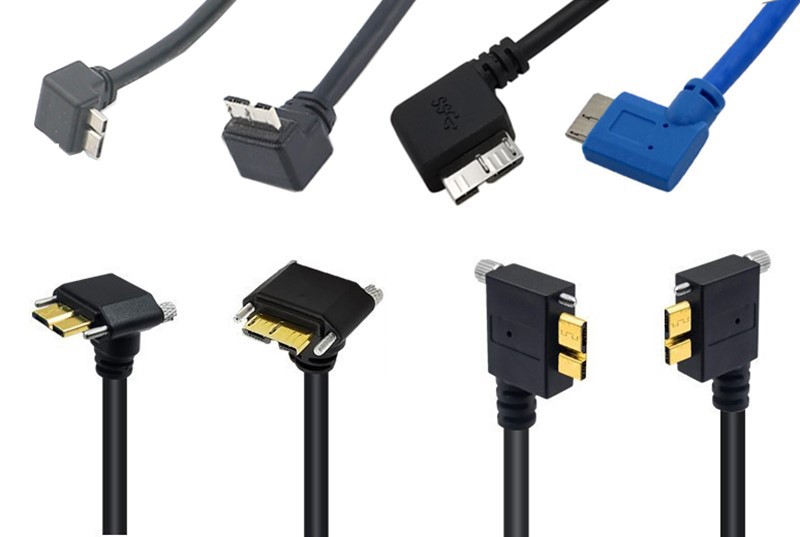
USB 3.0 Micro-B plug is actually composed of a standard USB 2.0 Micro-B connector with an additional 5-pin plug "stacked" on the side. Which allows a cable with the smaller 5-pin USB 2.0 Micro-B connector to plug into a device with a 10 pins USB 3.0 Micro-B receptacle. It is commonly used to make USB3.0 AM to Micro B cable, USB 3.0 Micro B cable with screw and 90 degree Micro B cable.
Common USB 2.0 wire just has 4 wires structure for data transfer(1 twisted Pair wires,White line and Green line) and power supply(2 wires,red line and black line), while USB3.0 Wire has extra 4 wires for receiving and transmitting signals. One line for power supply, one ground line and 2 data lines. It is the additional 4 lines (2 pairs) that provide the required bandwidth to support speeding, which support USB 3.0 cable to adds more parallel-mode physical bus.In addition, USB3.0 signal transmission is still controlled by host but is asynchronous. USB 3.0 data cable takes advantage of bidirectional data transmission mode instead of half-duplex mode of USB 2.0.

Feature Of USB 3.0 Cable
Super Speed Transmission
Support 5Gbps transfer rate, 10 times faster than USB 2.0. Suitable for high-speed data transmission and connection of large-capacity storage devices.
Universal Compatibility
Similar with common USB interface, backward compatible with USB 2.0 and USB 1.1 devices.
Stronger Power Supply
Provides 5V & 900ma power supply, meets most external devices needs.
Widely application:
Commonly used in external storage devices, HD cameras and printers, game controllers and headsets, etc.
Types of USB 3.0 Cable
USB3.0 Cable A to A features a combination of gold-plated USB 3.0 Type A connectors, 9 cores standard USB3.0 shielding wire, used to transfer or share data from external hard drives and other peripheral devices with a USB 3.0 A-Female port to computer or other USB host device. 90 degree angled USB3.0 A to A cable would be better when device in a limited space. If you need more secure installation on devices, panel mount USB 3.0 A to A cable supports to be mounted on a bulkhead surface, a wall plate, or a faceplate . We can also find USB3.0 A to A cable with screw in machine vision camera market, which can prevent standard USB connectors dislodged due to jostling, vibration, etc.
USB 3.0 A to B Cable:
USB 3.0 Cable A to B is mainly used to provide speedy file transfer between computer and devices equipped with USB3.0 B female port, such as USB 3.0 scanner, USB3.0 Printer, 3.5 inch hard drive enclosure or Monitor. 90 degree angled USB3.0 printer scanner cable is needed when devices are in a narrow space, and saves unwanted cable bending. If you want to keep two devices with more secure connection, Panel mount USB 3.0 A to B cable or USB 3.0 A to B cable with screw would be a good choice.
USB 3.0 A to Micro B Cable:
USB 3.0 Cable A to Micro B is mostly used to connect a portable external USB 3.0 hard drive or Samsung smartphones or tablets equipped with the USB 3.0 Micro-B port. USB 3.0 Micro B cable with screw is also popular in machine vision camera market, the screw design secures the connection and prevent accidental unplugging of the cable.
USB 3.0 motherboard cable:
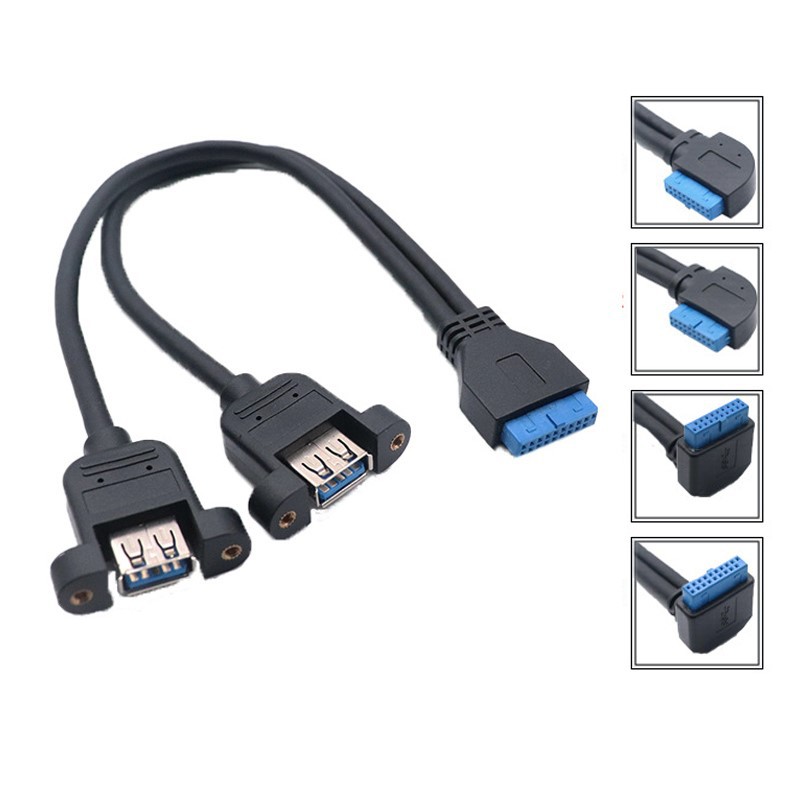
USB3.0 to 20 pin motherboard cable is usually used to extend a 20-pin motherboard USB 3.0 header connection, then add 2 internal female USB 3.0 (Type A) ports, support connect internal devices (internal card reader, hard drive, etc.) directly to motherboard, which allows for a cleaner installation, avoiding the need to run your cables outside the system case to external USB 3.0 ports.
USB 3.0 Active Extension Cable:
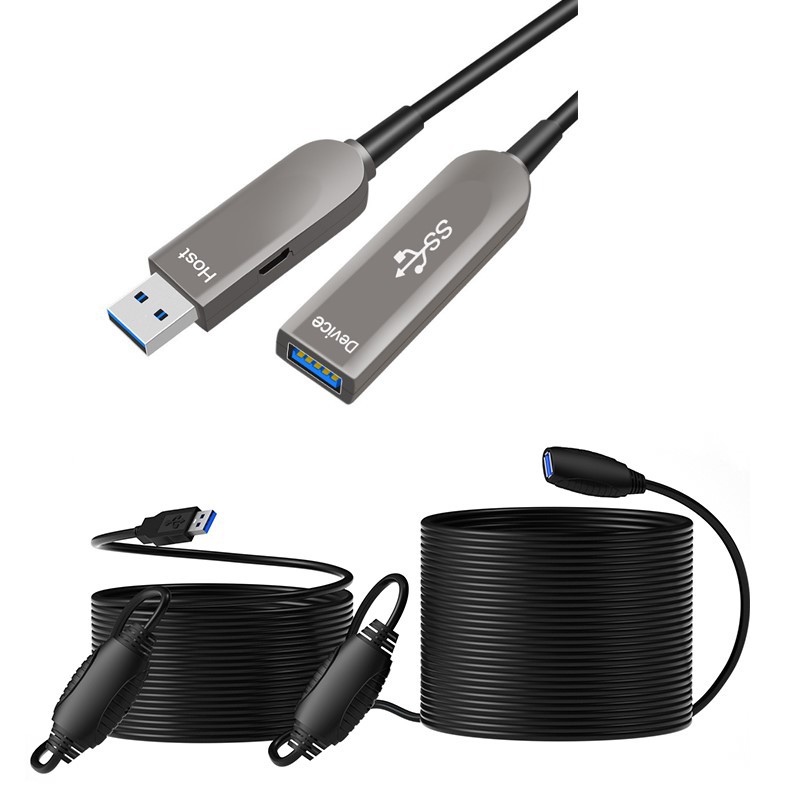
USB 3.0 Active Repeater Cable uses a build-in signal booster to extend transmission distance without signal loss and potential performance problems, supports devices to be connected at longer distances to PCs, laptops and tablets, compatible with storage devices, webcams and other Type A devices. Commonly length is 5.0m USB 3.0 extension cable and 10.0m USB 3.0 extension cable, if you need longer length USB3.0 Cable, maybe USB3.0 AOC fiber optic hybrid cable would be better.
Practical Application Of USB 3.0 Cable

Computer Peripherals Devices and Consumer Electronics:
Super speed USB 3.0 cable can connect to various peripherals devices, provide 5Gbp/s transfer rate and power supply, compatible with external hard drives, SSD, phone, digital camera, printers, scanners, etc.

Video Conferencing Systems and Medical Imaging Equipment:
USB 3.0 super speed cables can connect high-definition cameras and microphone arrays, support high-level video and audio transmission, suitable for remote conferencing and online education. In the medical field, USB 3.0 cables are used to connect medical equipment to to transmit high-resolution medical images, such as ultrasound machines, endoscopes, etc.

Industrial Automation and USB Centralized Management System:
Micro USB 3.0 cable can connect industrial cameras, ace camera, sensors, and data acquisition devices to achieve real-time data transmission. Also can be used to centrally manage USB devices such as USB hubs and KVM switches.
How to Select USB3.0 Cable?
Data Transfer Speed:
If you need transfer speed around 0.5Gbps to 5Gbps, USB 3.0 Cable would be a good choice. USB 2.0 Cable supports 480Mbps transfer rate, while USB 3.2 Gen2 cable supports 10Gbps transfer rate, USB 3.2 Gen2x2 cable supports 20Gbps, USB 4.0 Cable supports 40Gbps transfer rate.
USB 3.0 Connector Type:
You can confirm USB 3.0 connector type on device port, then choose related USB3.0 cable connector.(USB 3.0 Type A connector, USB 3.0 Type B connector, USB 3.0 Micro B connector)
Suitable Cable Length:
According to devices to host device distance, choose suitable USB 3.0 Cable length, longer USB 3.0 cable length can reduce related transfer rate. If distance is exceed 5.0 meter, USB 3.0 active cable would be better.
Materials Quality:
Choose durable materials to withstand wear and tear, like reinforced USB 3.0 connector and standard USB 3.0 shielding wire.
Related Cable Certification:
Check USB 3.0 cable jacket UL no. And related USB-IF certification.
Related User Reviews:
Check related USB 3.0 Cable use comments, understand related USB 3.2 Gen 1 cable reliability and real-world performance.
As a professional USB 3.0 cable factory, Starte makes full series USB 3.0 cables, also known as Superspeed or USB 3.2 Gen 1. We provides USB 3.0 Cable with male or female connector, such as USB-A, Micro USB and USB-B for connecting cameras, printers, Scanners, external hard drives and mobile phones to computer or devices with USB3.0 ports.
As a reliable custom USB 3.0 Cable manufacturer in China, Starte are good at providing custom USB 3.0 cable assembly solutions to meet clients specific requirements. All series of USB 3.0 Cable mould ensure Starte to offer a comprehensive range of custom USB 3.0 cables to suit your needs.
Our product line includes:
90 degree USB 3.0 Cable
USB 3.0 Coiled Cable
FAQ
Q: Is USB 3.0 the same as 3.1 Gen 1?
A: It was a big improvement from USB 2.0 which first arrived in 2000 with transfer speeds of only 480 Mbit/s. Since then, we've moved on from USB 3.0 which is now known as USB 3.1 Gen 1. Therefore, USB 3.0 is the same thing as USB 3.1 Gen 1.
Q: Does USB 3.0 have power delivery?
A: USB 3.0 and 3.1 allow 5V at 900 mA (4.5W). Certified Hosts and Devices must limit their power delivery and consumption to these "default" power levels.
Q: Does USB 3.0 support fast charging?
A: It also allows a device to pull more power than a standard USB port for faster charging. A normal USB 2.0 port provides up to 500mA (0.5A) and a USB 3.0 port provides up to 900mA (0.9A).
Q: Can I use a 3.0 USB in a 3.1 port?
A: When it comes to USB 3.1 Gen 1 and Gen 2, the only difference is speed and they're backwards compatible with USB 3.0 and USB 2.0. In the future, with newer generations of USB standards and the arrival of USB-C, there will be even better improvements.
Q: Is there a difference between a USB 2.0 cable and a USB 3.0 cable?
A: USB 3.0 cables and devices were designed to achieve a faster speed rate. Compared to USB 2.0, the new standard is better in data transfer speed and power management.
Q: How do I identify USB 3.0 ports?
A: On a PC, USB 3.0 ports can be identified by checking the Device Manager. You can also identify the physical ports on your computer which will either be blue, or marked with a “SS” (SuperSpeed) logo.
Q: What is the difference between USB 2.0 and USB 3.0 pins?
A: The VBUS, D−, D+, and GND pins are required for USB 2.0 communication. The five additional USB 3.0 pins are two differential pairs and one ground (GND_DRAIN). The two additional differential pairs are for SuperSpeed data transfer; they are used for full duplex SuperSpeed signaling.
Q: Is USB 3.0 the same as USB-C?
A: USB-C is electrically compatible with older USB 3.0 ports. But because of the shape of the newer port, adapters or cables with appropriate plugs are indeed required if you want to connect anything that doesn't have the USB-C oval shape.
Q: How can you tell a USB 3.0 port?
A: Compared with ordinary older UBS ports, USB 3.0 ports usually have a bit of blue around or within the jack itself. Some laptop makers will also label the faster port with a “3.0” or sometimes “SS,” which stands for SuperSpeed USB
Q: Are all USB 3.0 cables blue?
A: USB 3.0 Type-A and B connectors are usually blue, to distinguish them from USB 2.0 connectors, as recommended by the specification, and by the initials SS. USB 3.1, released in July 2013, is the successor specification that fully replaces the USB 3.0 specification.
Q: What is the difference between USB 2.0 and 3.0 printer cable?
A: USB 3.0: These cables have more internal wires (9 compared to USB 2.0's 4), which enables their higher data transfer rates and increased power delivery. The additional wires help maintain signal integrity and speed. USB 3.0 cables are often thicker and may feel more robust compared to USB 2.0 cables.
Q: What is the USB 3.0 Micro B used for?
A: Micro USB 3.0 (Micro-B) plug and receptacle are intended primarily for small portable devices such as smartphones, digital cameras and GPS devices. The Micro USB 3.0 receptacle is backward compatible with the Micro USB 2.0 plug.
Q: What is the purpose of USB 3.0 B?
A: USB Type A connectors have been the universal standard since USB 1.1, with connections built into wall sockets, computers, vehicles, televisions, interfaces, and audio technology of all kinds. USB 3.0 Type B can be found on larger devices such as printers and scanners. Some storage devices and drives use them, as well.
Q: What is USB 3.0 Type B used for?
A: There is also the USB Type B Mini, primarily found on digital cameras, USB hubs, and external hard drives, and the USB Type B Micro which is used by modern Android phones.
Q: Is there a difference between USB 2.0 and 3.0 extension cable?
A: If you're extending the reach of a keyboard or mouse, USB 2.0 cables will likely suffice. However, for tasks involving large data transfers, video streaming, or connecting power-hungry devices, USB 3.0 extension cables are the superior choice
Q: What is the USB 3.0 used for on a motherboard?
A: Modern computers will often include USB 3.0 ports as USB A and USB C connectors. USB 3.0 still offers good enough speed for almost all consumer uses except extremely fast flash based external data transfers. USB 3.0 is commonly used to connect external high-speed devices like thumb drives.
Q: Can I plug USB 3.2 into a 3.0 motherboard?
A: It works and it is a very good answer. "USB 3.2 Gen2" will fit for "USB 3.1 Type-C", and "USB 3.2 Gen1" will fit for "USB 3.0"
Shenzhen Starte Technology Co., Ltd is one of the most professional usb 3.0 cable manufacturers and suppliers in China. Welcome to wholesale bulk high quality usb 3.0 cable made in China here from our factory. For customized service, contact our factory.