


Hey there! As a supplier of 50 Pin SCSI Cables, I often get asked about the power consumption of devices connected via these cables. It's a super important topic, especially for those looking to optimize energy usage and manage costs. So, let's dive right in and break it down!
Understanding the Basics of 50 Pin SCSI Cables
First off, what are we talking about when we say 50 Pin SCSI Cables? SCSI, which stands for Small Computer System Interface, was a widely used standard for connecting various devices to a computer server. The 50-pin version was quite popular for its ability to transmit both data and power, making it a versatile option for a range of devices.
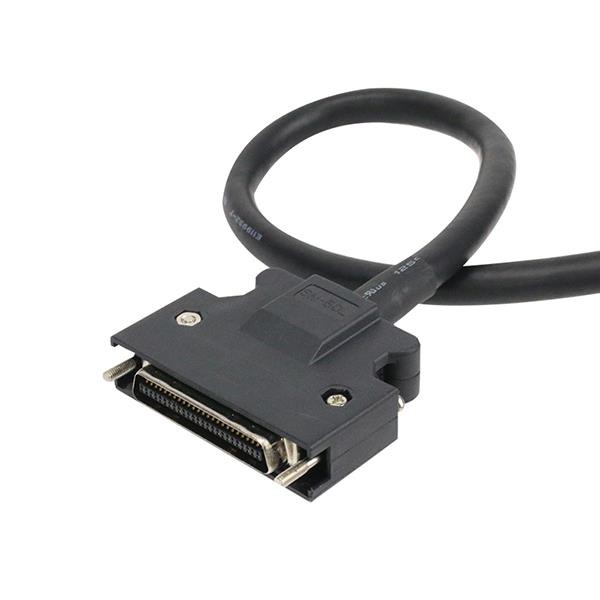
There are a few different types of 50 Pin SCSI Cables out there. For instance, the Micro DB 50 Pin SCSI Cable is known for its compact design, which is great for tight spaces. Then, there's the Micro Centronics 50 Pin SCSI Cable, which is often used in printers and other peripheral devices. And let's not forget the HD 50 Female Cable with Latch Bracket, which provides a secure connection and is commonly used in high - end storage systems.
Factors Affecting Power Consumption
The power consumption of a device connected via a 50 Pin SCSI Cable isn't a one - size - fits - all number. There are several factors that come into play.
1. Device Type
Different devices have different power requirements. For example, a hard drive connected via a 50 Pin SCSI Cable will consume more power than a simple scanner. Hard drives need to spin their platters and operate read/write heads, which demands a significant amount of energy. On the other hand, scanners usually only need power for the scanning mechanism and the control electronics, so their power consumption is relatively low.
2. Usage Patterns
How often a device is used also affects power consumption. If a SCSI - connected device is constantly in use, like a database server's storage drive that's accessed 24/7, it will consume more power compared to a device that's only used occasionally, such as an old - fashioned tape drive for backups that might only be accessed once a month.
3. Cable Quality
Believe it or not, the quality of the 50 Pin SCSI Cable can impact power consumption. A well - made cable with proper insulation and low resistance will transmit power more efficiently. This means less power is wasted as heat during transmission. In contrast, a cheap, poorly made cable might have higher resistance, leading to more power loss and, ultimately, higher overall power consumption.

Measuring Power Consumption
So, how can you figure out the power consumption of a device connected via a 50 Pin SCSI Cable? Well, there are a few ways.
One option is to use a power meter. You can plug the device into the power meter, which will then measure the amount of electricity it uses over a certain period. This is a pretty accurate way to get real - world power consumption numbers.
Another way is to look at the device's specifications. Most manufacturers will list the power requirements of their devices, either in watts or in amps. However, keep in mind that these are usually theoretical values, and the actual power consumption can vary depending on usage and other factors.
Examples of Power Consumption
Let's take a look at some real - world examples to give you a better idea of what we're talking about.
A typical SCSI hard drive from a few years ago might consume around 10 - 15 watts when it's actively reading or writing data. When it's idle, the power consumption might drop to 3 - 5 watts. On the other hand, a SCSI - connected printer might use around 50 - 100 watts during the printing process but could consume as little as 10 - 20 watts when it's in standby mode.
Energy - Saving Tips
If you're looking to reduce the power consumption of devices connected via 50 Pin SCSI Cables, here are some tips:
- Use Energy - Efficient Devices: When it's time to upgrade your equipment, look for devices that are designed to be energy - efficient. Many modern devices have power - saving features that can significantly reduce their energy usage.
- Optimize Cable Length: Try to keep your 50 Pin SCSI Cables as short as possible. Longer cables can have higher resistance, which leads to more power loss.
- Implement Power - Management Settings: Most operating systems allow you to set power - management options for your devices. You can configure your devices to go into sleep mode after a certain period of inactivity, which can save a lot of energy over time.
Why Choose Our 50 Pin SCSI Cables
As a supplier of 50 Pin SCSI Cables, we take pride in offering high - quality products. Our cables are designed to minimize power loss and ensure efficient power transmission. We use top - grade materials and strict manufacturing processes to guarantee the reliability and performance of our cables.
Whether you need a Micro DB 50 Pin SCSI Cable for a compact setup, a Micro Centronics 50 Pin SCSI Cable for your peripheral devices, or a HD 50 Female Cable with Latch Bracket for a high - end storage system, we've got you covered.
Let's Talk Business
If you're in the market for 50 Pin SCSI Cables or want to learn more about how our products can help you manage power consumption, I'd love to hear from you. Whether you're a small business looking to optimize your energy usage or a large enterprise in need of reliable cables, we're here to assist. Reach out to us for a quote or to discuss your specific requirements. We're committed to providing the best products and services to meet your needs.
References
- "SCSI Technology Handbook"
- Manufacturer specifications of SCSI - connected devices
- Industry reports on power consumption in computer systems