


In the world of data transfer and connectivity, the 14-pin SCSI cable has long been a staple, playing a crucial role in various computing and storage setups. As a dedicated supplier of 14-pin SCSI cables, I often encounter questions from customers about the versatility of these cables, especially regarding their use with external devices. In this blog post, I'll delve into the details of whether a 14-pin SCSI cable can be used for external devices, exploring the technical aspects, potential applications, and limitations.
Understanding the 14-Pin SCSI Cable
Before we discuss its use with external devices, let's first understand what a 14-pin SCSI cable is. SCSI, which stands for Small Computer System Interface, is a set of standards for physically connecting and transferring data between computers and peripheral devices. The 14-pin SCSI cable is designed to handle specific types of data transfer and communication protocols within the SCSI framework.
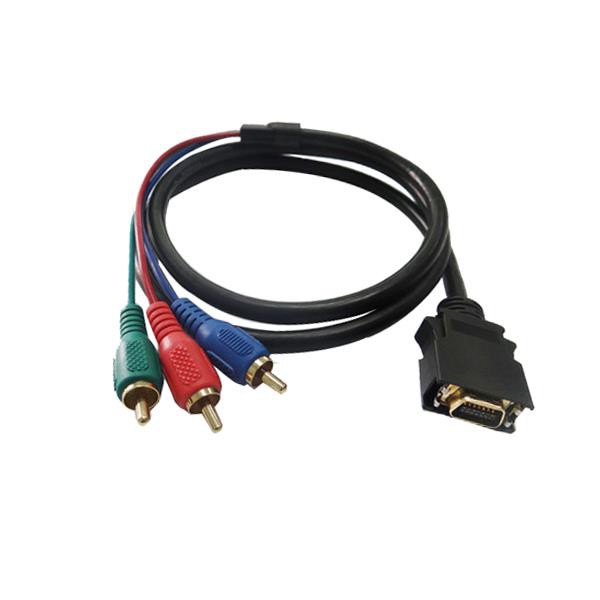
These cables typically feature a 14-pin Mini-DIN Receptacle (MDR) connector on one end, which is used to interface with SCSI-compatible devices. The other end may have various types of connectors, depending on the specific application and the device it needs to connect to. Some common configurations include MDR 14 Pin to 3 Ports RCA Cable, which allows for connection to audio and video devices, and 14 MDR Pin Cable Assembly and MDR 14 Pin Cable Assembly, which are used for more general data transfer purposes.
Can a 14-Pin SCSI Cable be Used for External Devices?
The short answer is yes, a 14-pin SCSI cable can be used for external devices, but with certain considerations. The compatibility of a 14-pin SCSI cable with an external device depends on several factors, including the device's SCSI interface requirements, the cable's specifications, and the data transfer protocol used.

Compatibility with SCSI-Enabled External Devices
Many external storage devices, such as external hard drives and tape drives, are equipped with SCSI interfaces. These devices can be connected to a computer or other host device using a 14-pin SCSI cable. The cable provides a reliable and high-speed connection for data transfer between the external device and the host, allowing for efficient storage and retrieval of data.
In addition to storage devices, some external printers, scanners, and even certain types of networking equipment may also support SCSI interfaces. By using a 14-pin SCSI cable, these devices can be easily integrated into a larger computing system, enabling seamless communication and data transfer.
Considerations for Non-SCSI External Devices
While a 14-pin SCSI cable is primarily designed for SCSI-compatible devices, it may be possible to use it with non-SCSI external devices through the use of adapters or converters. However, this approach requires careful consideration and may have limitations.
For example, if you want to connect an external audio or video device to a computer using a 14-pin SCSI cable, you may need to use a MDR 14 Pin to 3 Ports RCA Cable adapter. This adapter allows you to convert the SCSI signal into a format that can be understood by the audio or video device. However, it's important to note that the data transfer rate and quality may be affected by the adapter, and there may be compatibility issues that need to be addressed.
Advantages of Using a 14-Pin SCSI Cable for External Devices
There are several advantages to using a 14-pin SCSI cable for external devices:
High-Speed Data Transfer
SCSI cables are known for their high-speed data transfer capabilities. A 14-pin SCSI cable can support data transfer rates of up to several megabytes per second, making it ideal for applications that require fast and efficient data transfer, such as large file transfers and real-time data streaming.
Reliability and Durability
14-pin SCSI cables are designed to be robust and reliable. They are typically made with high-quality materials and are built to withstand the rigors of daily use. This makes them a good choice for external devices that need to be connected and disconnected frequently.
Compatibility with Legacy Systems
Many older computers and peripheral devices still support SCSI interfaces. By using a 14-pin SCSI cable, you can easily connect these legacy systems to modern external devices, allowing for continued use and integration of older equipment.
Limitations of Using a 14-Pin SCSI Cable for External Devices
While there are many advantages to using a 14-pin SCSI cable for external devices, there are also some limitations that need to be considered:
Limited Device Support
Not all external devices support SCSI interfaces. As technology has advanced, many newer devices have moved away from SCSI in favor of other interfaces, such as USB, Thunderbolt, and Ethernet. This means that the use of a 14-pin SCSI cable may be limited to older or specialized devices.
Complexity of Setup
Setting up a 14-pin SCSI connection can be more complex than other types of connections. It may require the use of additional hardware, such as terminators and adapters, and may involve configuring the SCSI settings on both the host device and the external device. This can be a challenge for users who are not familiar with SCSI technology.
Cost
14-pin SCSI cables and related components can be more expensive than other types of cables and connectors. This is due in part to the specialized nature of SCSI technology and the relatively low demand for SCSI-compatible devices in the modern market.
Conclusion
In conclusion, a 14-pin SCSI cable can be used for external devices, but with certain considerations. While it offers high-speed data transfer, reliability, and compatibility with legacy systems, it also has limitations in terms of device support, setup complexity, and cost.
If you are considering using a 14-pin SCSI cable for an external device, it's important to carefully evaluate your specific needs and requirements. Make sure that the device you want to connect is SCSI-compatible, and consider the potential challenges and limitations that may arise.
As a supplier of 14-pin SCSI cables, I am committed to providing high-quality products and expert advice to help you make the right choice for your connectivity needs. If you have any questions or need further assistance, please don't hesitate to contact me for more information and to discuss your procurement options.
References
- "SCSI Technology Overview." SCSI-3.org.
- "Understanding SCSI Cables and Connectors." TechTarget.
- "External Storage Devices and SCSI Interfaces." StorageReview.com.