


In the era of rapid technological advancement, the integration of smart home devices into our daily lives has become increasingly prevalent. These devices offer unparalleled convenience, automation, and energy efficiency, transforming our living spaces into intelligent environments. As a serial cable supplier, I often receive inquiries from customers about using serial cables to connect their computers to smart home devices. In this blog post, I will explore the feasibility of this connection, the types of serial cables available, and the considerations to keep in mind.
Understanding Serial Communication
Before delving into the connection process, it's essential to understand what serial communication is. Serial communication is a method of transmitting data one bit at a time over a single communication line or channel. This is in contrast to parallel communication, where multiple bits are transmitted simultaneously over multiple lines. Serial communication is commonly used in various applications, including computer peripherals, industrial automation, and smart home devices, due to its simplicity, cost - effectiveness, and long - distance capabilities.
Can I Use a Serial Cable to Connect My Computer to a Smart Home Device?
The short answer is yes, in many cases, you can use a serial cable to connect your computer to a smart home device. However, several factors need to be considered:
Compatibility
The first and most crucial factor is compatibility. Both your computer and the smart home device must support serial communication. Most modern computers have moved away from traditional serial ports (such as RS - 232) in favor of USB, Ethernet, and wireless connections. However, some older computers or specialized industrial PCs may still have serial ports. On the smart home device side, it should have a serial interface that can communicate with the computer. For example, some legacy smart thermostats, security systems, or lighting control modules may feature serial ports for configuration and monitoring.
Protocol
Serial communication relies on specific protocols to ensure that data is transmitted and received correctly. Common serial protocols include RS - 232, RS - 422, and RS - 485. The computer and the smart home device must use the same protocol or have a way to convert between them. For instance, if your computer has an RS - 232 port and the smart home device uses RS - 485, you will need a protocol converter to establish a successful connection.
Cable Type
There are different types of serial cables available, each with its own pin configuration and specifications. Here are some common types:
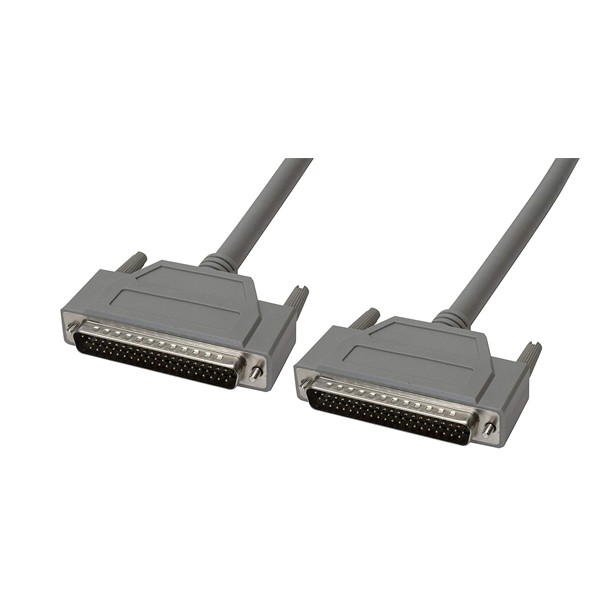
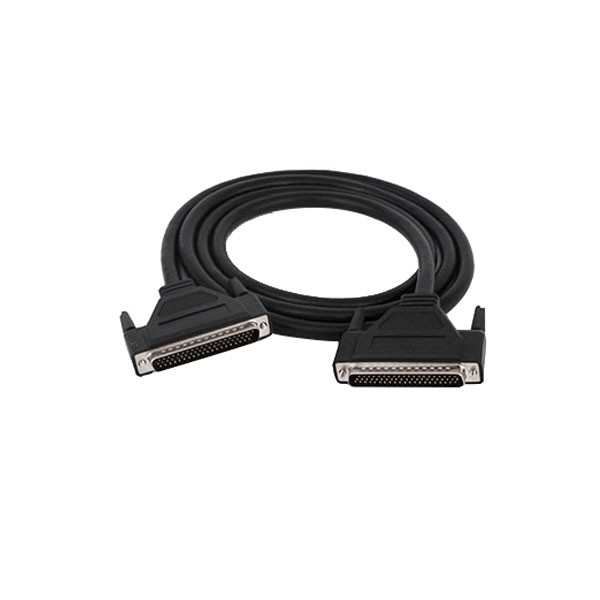
- DB 50 Pin Male To 50 Pin Male Cable: This type of cable is often used in industrial applications where a large number of signals need to be transmitted. It can be used to connect a computer to a smart home device if both have 50 - pin serial connectors. You can find more information about this cable DB 50 Pin Male To 50 Pin Male Cable.
- HD62 Pin Male To HD62 Pin Male Cable: The HD62 pin cable is typically used in high - density applications. It may be suitable for connecting a computer to a complex smart home device that requires a large number of data lines. To learn more about this cable, visit HD62 Pin Male To HD62 Pin Male Cable.
- DB15 Male to Female Serial Cable: The DB15 cable is commonly used for video and some serial communication applications. It can be used to connect a computer with a DB15 male port to a smart home device with a DB15 female port. More details about this cable can be found DB15 Male to Female Serial Cable.
Advantages of Using a Serial Cable for Smart Home Device Connection
- Reliability: Serial cables provide a stable and reliable connection, especially in environments where wireless signals may be interfered with. This is crucial for smart home devices that require continuous communication, such as security systems or climate control devices.
- Long - distance Communication: Serial communication can support longer distances compared to some other communication methods. This makes it suitable for large - scale smart home installations where the computer may be located far from the smart home device.
- Low Cost: Serial cables are generally more affordable than some other types of cables and communication technologies. This makes them an attractive option for budget - conscious smart home projects.
Disadvantages and Challenges
- Limited Data Transfer Rate: Serial communication typically has a lower data transfer rate compared to Ethernet or USB. This may be a limitation if you need to transfer large amounts of data quickly, such as high - resolution video from a smart home camera.
- Lack of Standardization: There is a lack of standardization in serial communication, which can make it difficult to ensure compatibility between different devices. You may need to spend time researching and testing different cable types and configurations.
- Physical Space: Serial ports and cables can take up more physical space on your computer and the smart home device compared to more compact USB or wireless interfaces.
Steps to Connect a Computer to a Smart Home Device Using a Serial Cable
- Check Compatibility: As mentioned earlier, verify that both your computer and the smart home device support serial communication and use the same protocol.
- Select the Right Cable: Based on the pin configurations of the computer and the smart home device, choose the appropriate serial cable.
- Connect the Cable: Carefully plug one end of the serial cable into the computer's serial port and the other end into the smart home device's serial port. Make sure the connections are secure.
- Configure the Software: On your computer, you may need to configure the serial communication settings, such as baud rate, data bits, stop bits, and parity. These settings should match the settings of the smart home device.
- Test the Connection: Once the software is configured, test the connection by sending and receiving data between the computer and the smart home device.
Conclusion
Using a serial cable to connect your computer to a smart home device is a viable option in many situations, especially when dealing with legacy devices or when a reliable, long - distance connection is required. However, compatibility, protocol, and cable type are critical factors that need to be carefully considered. As a serial cable supplier, we offer a wide range of high - quality serial cables, including DB 50 Pin Male To 50 Pin Male Cable, HD62 Pin Male To HD62 Pin Male Cable, and DB15 Male to Female Serial Cable, to meet your specific needs.
If you are planning a smart home project and need help with serial cable selection or have any questions about serial communication, we are here to assist you. Contact us for more information and to discuss your procurement needs. Our team of experts can provide you with detailed product information and technical support to ensure a successful smart home connection.
References
- "Serial Communication Basics", Electronics - Tutorials.ws
- "Smart Home Technology: A Comprehensive Guide", Wiley Publications
- "Serial Cable Selection Guide", Industry Standard Publications