




Hey there! As a supplier of 100 Pin SCSI Cables, I often get asked about how to ensure proper grounding of these cables. It's a crucial aspect, and I'm here to share some tips and insights based on my experience in the industry.
First off, let's understand why proper grounding is so important. A 100 Pin SCSI Cable is used in various high - performance data transfer applications. Grounding helps to protect the cable and the connected devices from electrical interference, static electricity, and electrical surges. Without proper grounding, you might face issues like data corruption, device malfunctions, and even potential damage to the equipment.
Understanding the Basics of Grounding
Grounding in a 100 Pin SCSI Cable involves creating a low - resistance path for electrical current to flow safely to the ground. This path helps to dissipate any unwanted electrical charges. The cable usually has specific pins dedicated to grounding. These pins need to be connected correctly to the ground terminals of the devices at both ends of the cable.
When you're dealing with a MC 100 Pin SCSI Cable Assembly, for example, you need to make sure that the grounding pins are firmly connected to the ground on the host device and the peripheral device. A loose connection can lead to intermittent grounding, which is just as bad as no grounding at all.
Checking the Cable for Grounding Integrity
Before you install the cable, it's a good idea to check its grounding integrity. You can use a multimeter to test the continuity of the grounding pins. Set the multimeter to the continuity or resistance mode. Connect one probe to a known ground point on the cable, and the other probe to each of the grounding pins. If the multimeter shows a very low resistance (close to zero), it means the grounding path is intact.
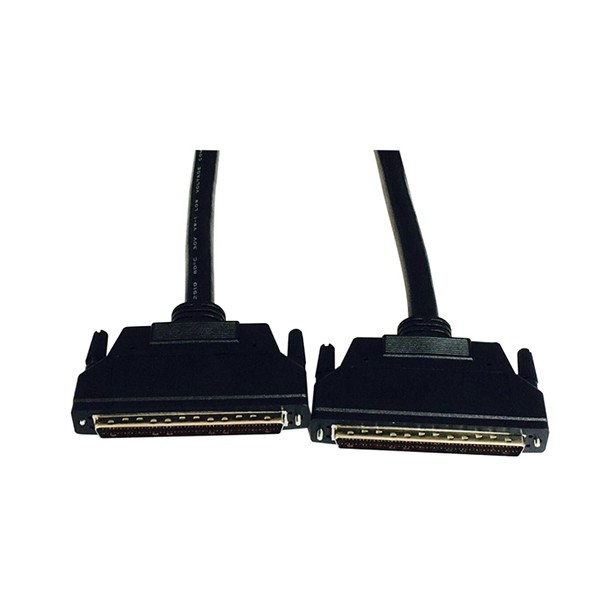
If you find that there's high resistance or no continuity, it could indicate a problem with the cable. Maybe there's a break in the grounding wire inside the cable. In such cases, it's best to replace the cable with a new one, like the 100 Pin Male to Male SCSI Cable.
Proper Installation for Grounding
When installing the 100 Pin SCSI Cable, make sure to follow the correct procedure. First, clean the connectors on both the cable and the devices. Dust and debris can interfere with the electrical connection, including the grounding connection.
Insert the cable connectors firmly into the device ports. Make sure that all the pins are properly aligned. A misaligned pin can not only affect the data transfer but also the grounding. Once the connectors are in place, secure them using the locking mechanisms provided. This will help to maintain a stable connection, including the grounding connection.
Shielding and Grounding
Many 100 Pin SCSI Cables come with shielding. The shield is designed to protect the cable from electromagnetic interference (EMI). The shield also needs to be properly grounded. The shield should be connected to the ground at both ends of the cable. This helps to create a Faraday cage effect, where the shield absorbs and dissipates any external EMI.
For a 0.80mm picth HDRA 100 Pin To VHDCI 100 Pin Servo SCSI Cable, the shielding is especially important due to its use in servo applications. Make sure that the shield is connected to the ground terminals of the devices in a way that provides a continuous and low - resistance path.
Testing After Installation
After installing the cable, it's a good idea to test the system to ensure that the grounding is working properly. You can run diagnostic tests on the connected devices. Check for any signs of electrical interference, such as strange noises, data errors, or device resets.
If you notice any issues, double - check the grounding connections. Sometimes, vibrations or movement can cause the connectors to loosen over time. Make sure that all the grounding pins are still firmly connected and that the shield is properly grounded.
Maintenance and Inspection
Regular maintenance and inspection of the 100 Pin SCSI Cable and its grounding are essential. Over time, the cable can wear out, and the grounding connections can become loose. Check the cable for any signs of physical damage, such as cuts or fraying. If you find any damage, replace the cable immediately.
Inspect the connectors for corrosion or oxidation. Corroded connectors can increase the resistance in the grounding path. You can clean the connectors using a contact cleaner to remove any corrosion.
Choosing the Right Cable
As a supplier, I can't stress enough the importance of choosing the right cable. Not all 100 Pin SCSI Cables are created equal. Look for cables that are made from high - quality materials and have proper shielding and grounding design.
Our cables are designed with the latest technology to ensure optimal grounding and data transfer performance. We use high - quality conductors and insulation materials to minimize resistance and interference.

Conclusion
Ensuring proper grounding of a 100 Pin SCSI Cable is essential for the reliable operation of your data transfer systems. By understanding the basics of grounding, checking the cable integrity, installing it correctly, and performing regular maintenance, you can avoid many common problems.
If you're in the market for high - quality 100 Pin SCSI Cables or have any questions about grounding or cable installation, don't hesitate to reach out. We're here to help you make the right choice and ensure that your systems run smoothly.
References
- Electronics Fundamentals: Circuits, Devices, and Applications by Thomas L. Floyd
- Handbook of Electronic Signal Processing by Dennis Teague