




Managing multiple SCSI adapters in a system can be a complex task, but with the right knowledge and strategies, it can be effectively accomplished. As a SCSI adapter supplier, I have extensive experience in dealing with various SCSI adapter models and configurations, and I'm here to share some valuable insights on how to manage multiple SCSI adapters in a system.
Understanding SCSI Adapters
Before delving into the management of multiple SCSI adapters, it's essential to have a basic understanding of what SCSI adapters are and how they function. SCSI (Small Computer System Interface) is a set of standards for physically connecting and transferring data between computers and peripheral devices. SCSI adapters act as the interface between the computer's motherboard and SCSI devices, enabling data transfer and communication.
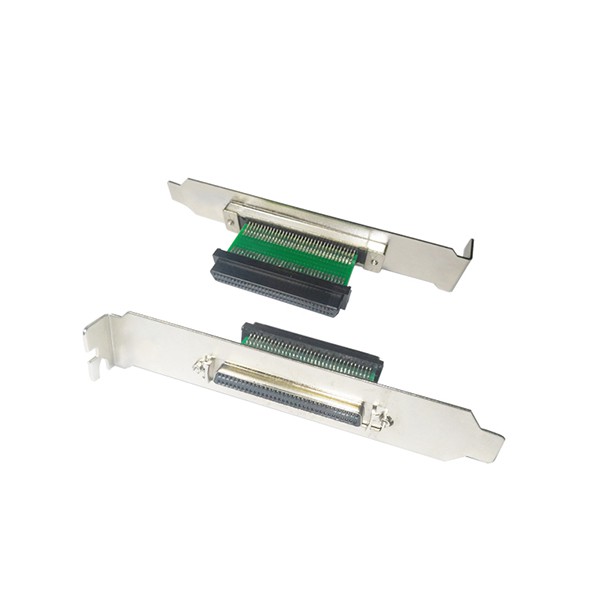
There are different types of SCSI adapters available in the market, each with its own features and capabilities. For example, the 68 Female to Female SCSI Adapter with Bracket is designed to provide a convenient way to connect two SCSI devices with 68-pin female connectors. The HPDB 68 Male to IDC 50 Male Adapter is useful for converting between different SCSI connector types. And the 68 Female to IDC 50 Male SCSI Adapter allows for the connection of a 68-pin female SCSI device to a 50-pin male SCSI device.
Planning the Installation
When managing multiple SCSI adapters in a system, proper planning is crucial. Here are some key steps to consider during the planning phase:
Assess System Requirements
First, evaluate your system's requirements and determine the number and types of SCSI adapters needed. Consider factors such as the number of SCSI devices you want to connect, the data transfer speed requirements, and the available system resources. Make sure your system has enough PCI or PCIe slots to accommodate the additional SCSI adapters.
Check Compatibility
Ensure that the SCSI adapters you choose are compatible with your system's operating system and hardware. Different SCSI adapters may have specific driver requirements, so it's important to check the manufacturer's documentation for compatibility information. Additionally, consider the compatibility of the SCSI devices you plan to connect to the adapters.
Allocate Resources
Proper resource allocation is essential for the smooth operation of multiple SCSI adapters. Each SCSI adapter requires system resources such as interrupt requests (IRQs), input/output (I/O) addresses, and DMA channels. Make sure to allocate these resources carefully to avoid conflicts. You may need to consult your system's BIOS settings or use device manager tools to configure the resource allocation.
Installation and Configuration
Once you have completed the planning phase, it's time to install and configure the SCSI adapters. Here are the general steps involved:
Physical Installation
- Power off your system and unplug it from the power source.
- Open the computer case and locate the available PCI or PCIe slots.
- Carefully insert the SCSI adapters into the appropriate slots, ensuring a secure connection.
- Close the computer case and reconnect the power supply.
Driver Installation
- Power on your system and let it boot up.
- Insert the driver CD that came with the SCSI adapters or download the latest drivers from the manufacturer's website.
- Follow the on-screen instructions to install the drivers for each SCSI adapter.
- After the driver installation is complete, restart your system.
Configuration
- Open the device manager on your system.
- Locate the SCSI adapters in the device manager and check for any error messages or conflicts.
- If necessary, configure the SCSI adapters' settings, such as the SCSI ID, transfer mode, and buffer size. These settings can usually be adjusted through the adapter's properties or a configuration utility provided by the manufacturer.
- Test the SCSI adapters by connecting the SCSI devices and performing data transfer operations.
Managing Multiple SCSI Adapters
After the installation and configuration are complete, you need to manage the multiple SCSI adapters effectively to ensure optimal performance. Here are some tips:
Monitor System Performance
Regularly monitor your system's performance to detect any issues or bottlenecks related to the SCSI adapters. Use system monitoring tools to track factors such as CPU usage, memory usage, and data transfer rates. If you notice any abnormal behavior, such as slow data transfer or frequent errors, investigate the cause and take appropriate action.

Update Drivers and Firmware
Keep the drivers and firmware of your SCSI adapters up to date. Manufacturers often release updates to improve performance, fix bugs, and add new features. Check the manufacturer's website regularly for the latest driver and firmware updates and install them as needed.
Troubleshoot Issues
If you encounter any problems with the SCSI adapters, such as device recognition issues or data transfer errors, follow a systematic troubleshooting approach. Start by checking the physical connections, ensuring that all cables are properly plugged in. Then, check the device manager for any error messages or conflicts. If necessary, reinstall the drivers or try using different SCSI devices to isolate the problem.
Contact for Purchase and Consultation
If you are interested in purchasing SCSI adapters or need further assistance with managing multiple SCSI adapters in your system, please feel free to contact us. Our team of experts is ready to provide you with professional advice and support. We offer a wide range of high-quality SCSI adapters, including the 68 Female to Female SCSI Adapter with Bracket, HPDB 68 Male to IDC 50 Male Adapter, and 68 Female to IDC 50 Male SCSI Adapter. Let's work together to meet your SCSI adapter needs.
References
- "SCSI: The Complete Reference" by George Shiffler
- "Small Computer System Interface (SCSI) Standards" by ANSI
- Manufacturer's documentation for SCSI adapters