




In today's digital age, data is the lifeblood of businesses and individuals alike. Ensuring the safety and integrity of your data through regular backups is crucial. One effective tool that can significantly simplify the data backup process is a Bulk Serial Adapter. As a leading supplier of Bulk Serial Adapters, I'm here to guide you on how to use this versatile device for efficient data backup.
Understanding the Bulk Serial Adapter
Before delving into the backup process, it's essential to understand what a Bulk Serial Adapter is and how it works. A Bulk Serial Adapter is a hardware device that allows you to connect multiple serial devices to a single computer or host system. It serves as a bridge between the serial devices and the computer, enabling seamless data transfer.
These adapters come in various configurations, supporting different serial interfaces such as RS - 232, RS - 422, and RS - 485. They are commonly used in industrial automation, telecommunications, and other fields where multiple serial devices need to be managed.

Preparing for Data Backup
Step 1: Select the Right Adapter
The first step in using a Bulk Serial Adapter for data backup is to choose the appropriate adapter for your needs. Consider the number of serial devices you need to connect, the type of serial interface they use, and the data transfer rate requirements. Our company offers a wide range of Bulk Serial Adapters that can meet various demands.
Step 2: Gather Your Equipment
In addition to the Bulk Serial Adapter, you'll need the following equipment:
- Serial devices that you want to back up (e.g., sensors, modems, or industrial controllers).
- Serial cables to connect the devices to the adapter.
- A computer or host system with the necessary software for data backup.
Step 3: Install the Adapter
Once you have all the equipment, it's time to install the Bulk Serial Adapter. Follow these steps:
- Connect the Bulk Serial Adapter to the computer using the appropriate interface (e.g., USB or PCIe).
- Install the device drivers on the computer. These drivers are usually provided by the adapter manufacturer and can be downloaded from their website.
- After the drivers are installed, restart the computer to ensure that the adapter is recognized correctly.
Connecting Serial Devices
Step 1: Identify the Serial Ports
On the Bulk Serial Adapter, each serial port is typically labeled. Identify the ports that you will use to connect your serial devices.
Step 2: Connect the Serial Cables
Use the appropriate serial cables to connect each serial device to the corresponding port on the adapter. Make sure the connections are secure to avoid data transfer issues.
Step 3: Check the Device Settings
Before starting the backup process, check the settings of each serial device. Ensure that the baud rate, data bits, stop bits, and parity settings on the devices match the settings configured on the adapter and the backup software.
Configuring the Backup Software
Step 1: Choose the Backup Software
There are many backup software options available, both free and paid. Choose a software that is compatible with your operating system and can support serial data backup. Some popular backup software includes Acronis True Image, Backup4all, and Macrium Reflect.
Step 2: Configure the Software
Open the backup software and follow these steps to configure it for serial data backup:
- Create a new backup job.
- Select the serial ports that are connected to the devices you want to back up.
- Specify the backup destination, such as an external hard drive, a network - attached storage (NAS) device, or a cloud storage service.
- Set the backup schedule. You can choose to perform a full backup, an incremental backup, or a differential backup depending on your needs.
Performing the Data Backup
Step 1: Start the Backup Job
Once the backup software is configured, start the backup job. The software will begin reading the data from the serial devices through the Bulk Serial Adapter and writing it to the specified backup destination.
Step 2: Monitor the Backup Process
During the backup process, monitor the progress to ensure that everything is working correctly. Check for any error messages or warnings that may indicate a problem with the data transfer or the backup software.
Step 3: Verify the Backup
After the backup is complete, verify the integrity of the backup data. You can do this by restoring a small portion of the data to a test environment and checking if it is readable and accurate.
Troubleshooting Common Issues
Serial Communication Errors
If you encounter serial communication errors during the backup process, check the following:
- Ensure that the serial cables are properly connected and not damaged.
- Verify that the serial device settings (baud rate, data bits, etc.) match the settings on the adapter and the backup software.
- Check for any interference or electromagnetic noise that may affect the serial communication.
Data Transfer Rate Issues
If the data transfer rate is too slow, you can try the following:
- Increase the baud rate on the serial devices and the adapter, if possible.
- Check if there are any other processes running on the computer that may be consuming system resources and slowing down the data transfer.
Additional Accessories
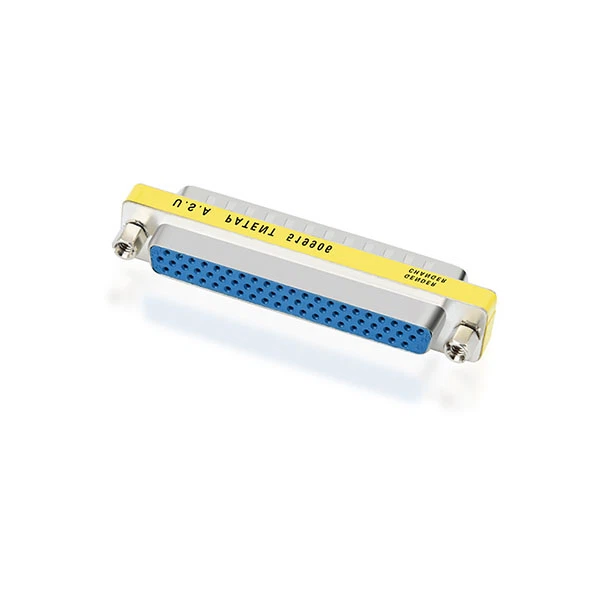
To enhance the functionality of your Bulk Serial Adapter, we also offer a range of accessories. For example, the HD62 Male To Female Slimline Gender Changer can be used to change the gender of the HD62 connector, allowing for more flexible connections. The DB44 Pin Male To Female Gender Changer is useful for similar purposes with DB44 connectors. And the Yellow DB9 Female to RJ45 Modular Adapter can convert a DB9 female port to an RJ45 modular connector.
Conclusion
Using a Bulk Serial Adapter for data backup is a practical and efficient way to protect your valuable serial data. By following the steps outlined in this guide, you can set up a reliable backup system that ensures the safety and integrity of your data.
If you are interested in purchasing a Bulk Serial Adapter or any of our related accessories, we invite you to contact us for further discussion. Our team of experts is ready to assist you in finding the best solutions for your data backup needs.
References
- Smith, J. (2018). Serial Communication Handbook. Publisher X.
- Brown, A. (2020). Data Backup Best Practices. Publisher Y.