


When it comes to installing a SCSI (Small Computer System Interface) connector, safety precautions are of utmost importance. As a reputable SCSI Connector supplier, I understand the significance of ensuring a safe installation process. In this blog post, I will share some essential safety precautions that should be taken during the installation of a SCSI connector.
1. Power Off and Discharge Static Electricity
Before starting the installation, it is crucial to power off all the connected devices. This includes the computer, server, or any other equipment that the SCSI connector will be attached to. Turning off the power helps prevent electrical shock and protects the components from potential damage.
In addition to powering off the devices, it is also necessary to discharge static electricity. Static electricity can build up on your body and cause damage to sensitive electronic components. To discharge static electricity, you can use an anti - static wrist strap or simply touch a grounded metal object, such as a metal table leg or a grounded electrical outlet cover.
2. Read the Manual
Each SCSI connector may have specific installation instructions provided by the manufacturer. It is highly recommended to carefully read the installation manual before proceeding with the installation. The manual will provide detailed information about the connector's pinout, proper orientation, and any special requirements.
Some SCSI connectors may have different types of interfaces, such as Ultra SCSI, Wide SCSI, or Fast SCSI. Understanding the specific type of SCSI connector you are working with and following the corresponding installation guidelines is essential for a safe and successful installation.
3. Use the Right Tools
Using the appropriate tools for the installation is another important safety precaution. You will typically need a Phillips - head screwdriver or a flat - head screwdriver, depending on the type of mounting screws used for the SCSI connector. Make sure the screwdriver is in good condition and has the correct size and shape to fit the screws properly.

Using the wrong tools can lead to stripped screws, which can make it difficult to secure the connector properly. It can also cause damage to the connector or the device it is being installed in.
4. Check the Environment
The installation environment plays a significant role in ensuring safety. The area where you are installing the SCSI connector should be clean, dry, and well - ventilated. Avoid installing the connector in areas with high humidity, dust, or excessive heat, as these conditions can affect the performance and lifespan of the connector.
If you are installing the SCSI connector in a server rack or a computer case, make sure there is enough space for proper cable management. Overcrowded spaces can lead to cable tangling, which can cause overheating and potential short - circuits.
5. Inspect the Connector and Cables
Before installation, carefully inspect the SCSI connector and the associated cables for any signs of damage. Look for bent pins, cracked housings, or frayed cables. Using a damaged connector or cable can lead to poor electrical connections, data transfer errors, and even electrical hazards.
If you find any damage, do not attempt to install the connector. Instead, contact your SCSI connector supplier for a replacement. At our company, we offer high - quality SCSI connectors and cables, and we stand behind the quality of our products.
6. Proper Cable Routing
Proper cable routing is essential for both safety and performance. When routing the SCSI cable, make sure it is not pinched, kinked, or stretched. Pinched or kinked cables can cause signal interference and damage to the cable insulation, which can lead to electrical shorts.
Keep the SCSI cable away from other power cables or sources of electromagnetic interference (EMI). EMI can disrupt the SCSI signal and cause data transfer problems. You can use cable ties or cable management clips to keep the SCSI cable organized and separated from other cables.
7. Grounding
Proper grounding is crucial for the safety of the SCSI connector and the connected devices. The SCSI connector should be properly grounded to prevent electrical shock and to reduce the risk of electromagnetic interference.
In most cases, the SCSI connector will be grounded through the device it is installed in. However, it is important to ensure that the grounding connection is secure. If you are installing the SCSI connector in a custom - built system, make sure to follow the grounding guidelines provided by the system manufacturer.
8. Test the Connection
After the installation is complete, it is important to test the SCSI connection to ensure that it is working properly. Power on the devices and run diagnostic tests if available. Check for any error messages or abnormal behavior.
If you encounter any problems during the testing phase, do not hesitate to contact your SCSI connector supplier for technical support. Our team of experts is always ready to assist you in troubleshooting any issues you may face.
Additional Products for Consideration
In addition to SCSI connectors, we also offer a wide range of other high - quality cables and adapters. For example, if you are looking for a serial adapter, you can check out our DB9 Male To Female Null Modem Mini Adapter. This adapter is perfect for connecting devices with different serial interfaces.
If you need to extend the reach of your USB 2.0 devices, our 5m USB 2.0 Active Repeater Extension Cable is an excellent choice. It provides a reliable and stable connection over a longer distance.
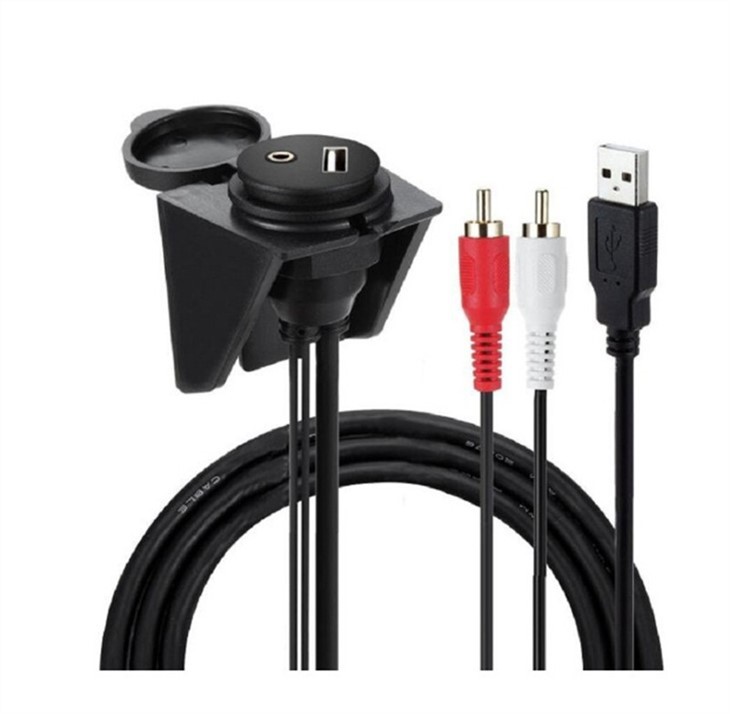
For those who want to connect their USB devices to a car audio system, our USB 2.0 To Dual RCA 3.5mm AUX Car Flush Mount Cable is a great option. It allows you to play music from your USB device through your car's audio system.
Conclusion
Installing a SCSI connector requires careful attention to safety precautions. By following the steps outlined in this blog post, you can ensure a safe and successful installation. As a SCSI Connector supplier, we are committed to providing high - quality products and excellent customer service. If you are interested in purchasing SCSI connectors or any of our other products, we invite you to contact us for a procurement discussion. We look forward to working with you to meet your connectivity needs.
References
- "SCSI Technology Handbook" by various authors
- Manufacturer's installation manuals for SCSI connectors