




When it comes to SCSI (Small Computer System Interface) adapters, understanding the necessary drivers is crucial for ensuring optimal performance and compatibility. As a leading SCSI adapter supplier, we have in - depth knowledge of these components and the software that makes them function effectively.
The Basics of SCSI Adapters
SCSI adapters are essential hardware devices that enable computers to communicate with SCSI - compatible storage devices, such as hard drives, tape drives, and optical drives. They serve as an interface between the computer's motherboard and the SCSI peripherals, translating data and commands between the two. Different types of SCSI adapters exist, including single - ended (SE) and differential (HVD or LVD) ones, each with its own characteristics and requirements.
Why Drivers are Necessary
Drivers act as the bridge between the operating system and the SCSI adapter hardware. Without the appropriate drivers, the operating system would not be able to recognize the SCSI adapter, let alone communicate with the connected SCSI devices. They provide the necessary instructions for the operating system to manage the adapter's functions, such as data transfer, device configuration, and error handling.
Types of Drivers for SCSI Adapters
Operating System - Specific Drivers
Most modern operating systems, such as Windows, Linux, and macOS, come with built - in support for a wide range of SCSI adapters. These built - in drivers are designed to provide basic functionality for common SCSI adapter models. However, for more advanced features or for less common adapter models, it may be necessary to install updated or custom drivers.
- Windows Drivers: Microsoft provides a comprehensive set of SCSI adapter drivers for its Windows operating systems. These drivers are included in the Windows installation media and are automatically installed during the setup process. However, if you are using a newer or specialized SCSI adapter, you may need to visit the manufacturer's website to download the latest drivers. For example, if you have a high - speed SCSI adapter that supports Ultra320 or Ultra640 SCSI standards, the built - in Windows drivers may not provide full support.
- Linux Drivers: Linux has a vast community of developers who contribute to the development of device drivers, including those for SCSI adapters. Many Linux distributions come with pre - installed SCSI drivers, but you can also find additional drivers in the official repositories or on the adapter manufacturer's website. The advantage of using Linux is that it allows for a high degree of customization, and you can often compile your own drivers if needed.
- macOS Drivers: Apple has its own set of drivers for SCSI adapters in macOS. However, as Apple has shifted its focus towards more modern storage interfaces like Thunderbolt and NVMe, support for SCSI adapters in macOS may be limited. If you are using an older Mac with a SCSI adapter, you may need to rely on third - party drivers or use virtualization software to run an operating system that has better SCSI support.
Vendor - Specific Drivers
Adapter manufacturers often develop their own drivers to provide full support for their products. These vendor - specific drivers are tailored to the unique features and capabilities of their SCSI adapters. They may offer additional functionality, such as improved performance optimization, advanced configuration options, and better compatibility with specific SCSI devices.
For example, if you are using a 68 Female to IDC 50 Male SCSI Adapter from our product line, our vendor - specific drivers will ensure that you can take full advantage of its features, such as seamless data transfer between 68 - pin and 50 - pin SCSI devices.
Installing SCSI Adapter Drivers
Windows Installation
- Identify the Adapter: First, you need to determine the make and model of your SCSI adapter. You can do this by checking the adapter itself or by using the Device Manager in Windows.
- Download the Drivers: Visit the manufacturer's website and download the appropriate drivers for your SCSI adapter and Windows version.
- Install the Drivers: Run the driver installation program and follow the on - screen instructions. In some cases, you may need to restart your computer after the installation is complete.
Linux Installation
- Check for Existing Drivers: Use the
lspciorlsusbcommands to check if your SCSI adapter is recognized by the system. If it is, you may already have the necessary drivers installed. - Update the Repositories: Run
sudo apt update(for Debian - based systems) orsudo yum update(for Red Hat - based systems) to ensure that you have the latest driver packages. - Install the Drivers: Use the package manager to install the SCSI adapter drivers. For example, on a Debian - based system, you can use
sudo apt install <driver - package - name>.
macOS Installation
- Check Compatibility: Make sure that your SCSI adapter is compatible with macOS. If it is, you can try using the built - in drivers.
- Download Third - Party Drivers: If the built - in drivers do not work, you may need to download third - party drivers from the adapter manufacturer's website.
- Install the Drivers: Double - click on the driver installer package and follow the on - screen instructions.
Compatibility Considerations
When choosing drivers for your SCSI adapter, it is important to consider compatibility with both the operating system and the connected SCSI devices. For example, if you are using a high - speed SCSI device, you need to make sure that the driver supports the device's data transfer rate.
Also, some SCSI adapters may require specific BIOS settings to work properly. Make sure to check the adapter's documentation for any BIOS configuration requirements.
Our Product Range and Associated Drivers
As a SCSI adapter supplier, we offer a wide range of SCSI adapters, each with its own set of drivers. For instance, our HD50 Female to Female Gender Changer is a useful accessory for connecting two HD50 - equipped SCSI devices. We provide detailed driver installation instructions and support to ensure that you can use this product without any issues.
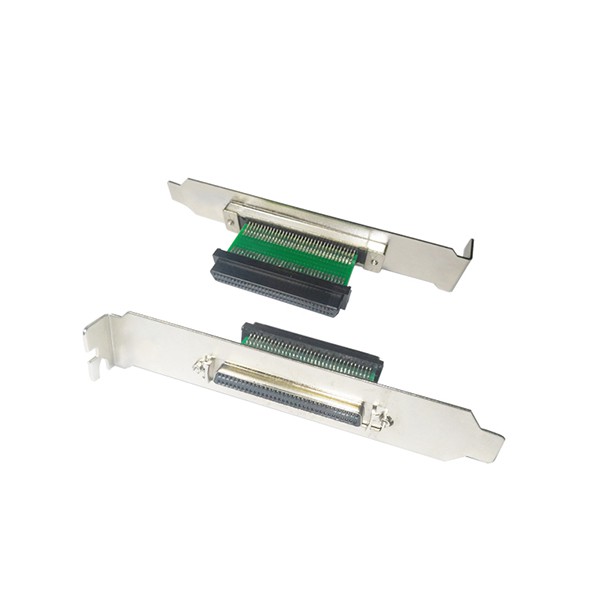
Our 68 Female to Female SCSI Adapter with Bracket is designed for more complex SCSI setups. It comes with high - quality drivers that are optimized for performance and compatibility.
Conclusion
In conclusion, understanding the drivers needed for a SCSI adapter is essential for a smooth and efficient computing experience. Whether you are a home user or a business professional, having the right drivers installed will ensure that your SCSI adapter and connected devices work at their best.
If you are in the market for SCSI adapters or need more information about the associated drivers, we are here to help. Our team of experts can provide you with detailed advice on driver selection, installation, and troubleshooting. Contact us today to start a discussion about your SCSI adapter requirements and let us help you find the perfect solution for your needs.

References
- "SCSI: The Complete Reference" by George Shiffler
- Microsoft Windows Device Driver Development Documentation
- Linux Kernel Documentation for SCSI Drivers
- Apple macOS Hardware Compatibility Guides