



DVI interface can be turned to VGA interface. Usually implemented by adapter DVI-I adapter VGA, Following are the steps of the operation:
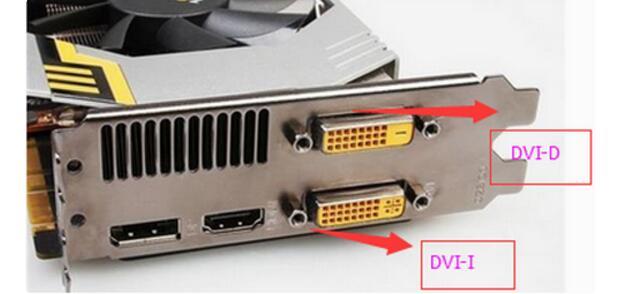
1. It is necessary to determine whether the interface on the graphics card is DVI-I (24+5) or DVI-D (24+1). In DVI (24+5 can be transferred, 24+1 can not be transferred) The transfer of the graphics card requires the interface support of the graphics card, as shown in the following figure;
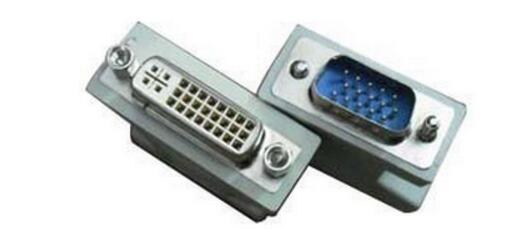
2. Buy DVI-I (24+5) to VGA adapter on the Internet or computer store, as shown below;
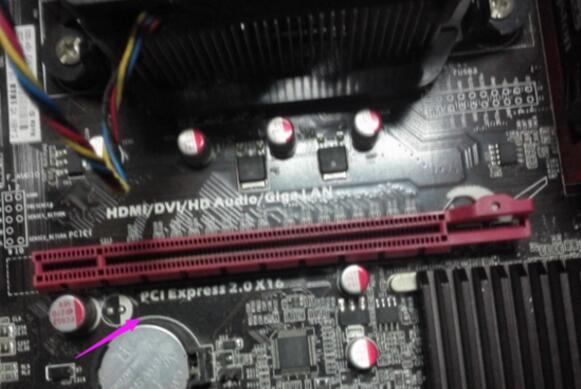
3. After the motherboard is powered off, remove the screws from the back of the chassis, open the back cover of the computer case, and remove the card from the chassis and the power supply. Place the chassis on the ground so that the motherboard is facing up. Make sure there is a card slot for the discrete graphics card on the motherboard (this is mostly the PCI-EX16), as shown below;
4. Insert the graphics card vertically (the graphics card is perpendicular to the card slot), the buckle next to the card slot will firmly hold the graphics card (if it is still not inserted, it is recommended to open the card slot with a buckle, then Inserted and fixed at the end), the interface of the external power supply on the top of the graphics card, to be connected to the power supply. If you have already installed the graphics card into the chassis, you can omit these steps 3 and 4, as shown below;
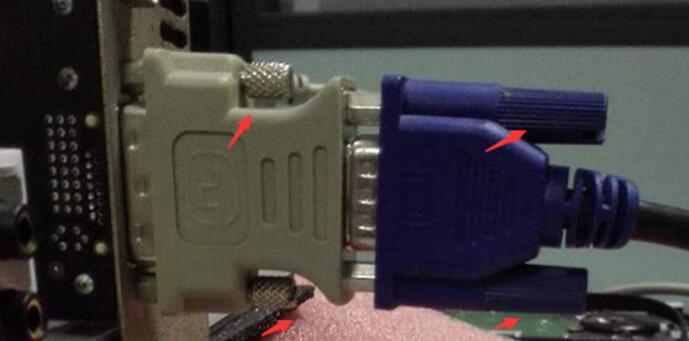
5. Connect one end of the adapter DVI-I to the DVI-I port of the graphics card, and connect the VGA cable of the display to the VGA port of the adapter at the other end (the screws of the interface must be fixed), as shown below;
6. After lighting, if you do not install the driver will be installed on the driver can be used.